
Control Charts for KPIs: Telling a Real Change From Normal Noise
A control chart shows whether a KPI has left the range it normally occupies. Here is how to set its limits, read the warning rules and avoid reacting to ordinary noise.


A control chart plots a metric in time order, with a centre line and two control limits. Points inside the limits are treated as ordinary variation. A point outside the limits, or a run of points that ordinary variation rarely produces, is a signal that the process has changed and deserves investigation. Use one when the question is whether this period's number is a real change or the normal movement of the metric.
Key takeaways
- Plot the KPI in time order. A single number has no reference point until you see the periods around it.
- Set the centre line and limits from a baseline period you judge to be normal. The limits are usually placed three standard deviations from the centre line.
- Investigate signals, not every movement. Reacting to ordinary variation tends to make a stable process look unstable.
- A signal says the process behaved differently from its baseline. It does not say why.
- Check that the metric's definition did not change inside the period you plot.
In this article
Why one number misleads
Suppose a team tracks weekly trial sign-ups, and a hypothetical quarter ranges from the high 80s to the low 130s. Is the low week a problem? Is the high week a success? Without a reference, either answer is a guess. Teams often react to the latest point: a drop triggers a change to a campaign, and a rise gets credited to the same campaign. Both reactions can be wrong, because a metric that is behaving normally still produces high weeks and low weeks.
This is the problem that regression to the mean describes. An unusually good week is often followed by a more ordinary one, even when nothing changed. A control chart gives the reference that a single point lacks. It answers one narrower question: has the metric moved outside the range it normally occupies? If not, the movement is most likely ordinary variation. If yes, or if the points show a pattern that ordinary variation rarely makes, the process deserves a closer look.
What a control chart shows
A control chart has four parts:
- The data points, in time order, one per period.
- The centre line (CL), usually the average over a baseline period.
- The upper and lower control limits (UCL and LCL), which mark the range the process produces while it behaves as it did in the baseline.
- Optional zone lines one and two standard deviations from the centre line, which the warning rules below use.
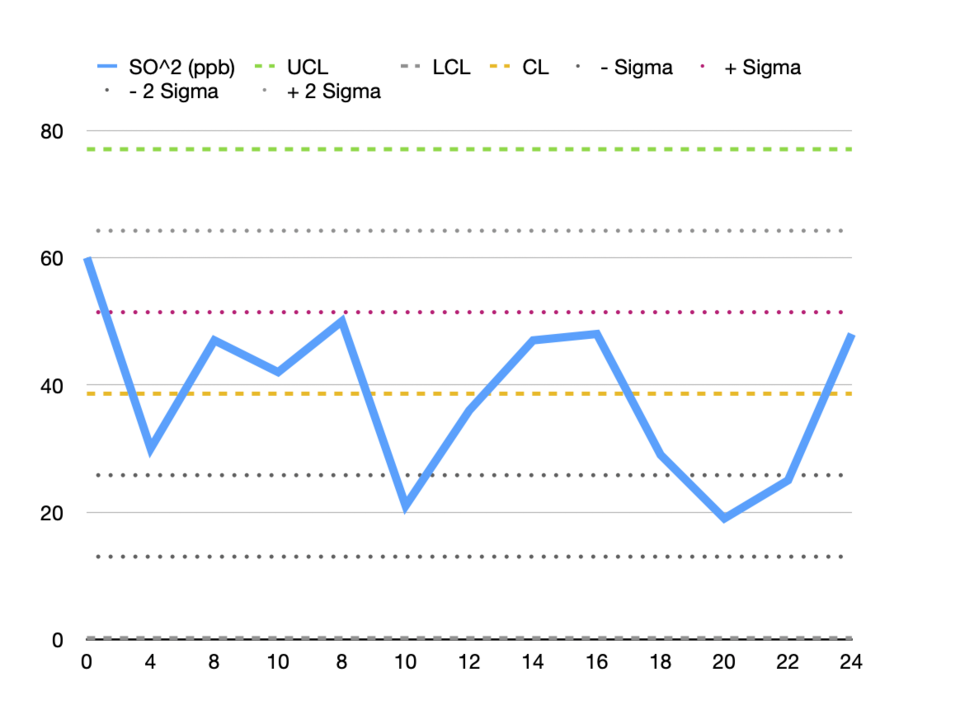

The method is named after Walter A. Shewhart, who developed it at Bell Labs in the 1920s. His framework separates variation that comes from the normal workings of a system from variation that comes from a specific, identifiable cause. Today these are usually called common-cause and special-cause variation, and a control chart is built to tell the two apart. Its limits describe what the process does when only common causes are at work. The control chart article on Wikipedia gives a concise overview of these terms.
Setting the centre line and limits
Choose a baseline period in which the process was running as usual. Calculate the average of that period as the centre line. For the limits, most practitioners place them three standard deviations on either side of the centre line. The Western Electric rules, which are covered in the next section, describe the limits as typically placed at ±3 standard deviations.
For individual readings, the ordinary standard deviation can be a poor choice. If the baseline contains a trend or a level shift, the standard deviation absorbs that movement, and the limits become too wide to be useful. A common alternative estimates the spread from the moving ranges, which are the differences between consecutive readings. Either way, write down the method and the baseline dates. A control chart is only comparable across time when its limits are not recalculated every time a new point arrives.
When to recalculate the limits
Recalculate when the process has changed on purpose, such as a new pricing page or a new onboarding flow, and when you have enough new points to describe the new state. Recalculating after each unusual week hides the signal you are trying to see, because the limits move to include the very shift you wanted to detect.
Warning rules and false alarms
A single point outside the control limits is one signal. Patterns can be signals too. The Western Electric rules, codified by a committee at the Western Electric Company and published in a 1956 handbook, describe patterns that ordinary variation rarely produces. The four basic rules are applied to one side of the centre line at a time:
| Rule | What it looks for |
|---|---|
| Rule 1 | One point beyond the 3? limit, that is, outside the control limits. |
| Rule 2 | Two of three consecutive points beyond the 2? line, on the same side of the centre line. |
| Rule 3 | Four of five consecutive points beyond the 1? line, on the same side of the centre line. |
| Rule 4 | Eight consecutive points on the same side of the centre line. |
Each rule is a trade-off. Assuming the observations are normally distributed, Rule 1 is triggered by chance about once in every 370 observations on average. When all four rules are evaluated, the false alarm rate rises to about once in every 91.75 observations, according to the summary of the rules on Wikipedia. More rules catch more real shifts, and they also produce more false alarms. Choose the rule set before you look at the data, write it on the chart, and apply it the same way each period.
A worked example with a level shift
The chart below uses illustrative values made for this article. Weeks 1 to 12 form the baseline. The centre line and limits are calculated from those weeks only. Weeks 13 to 20 are then plotted against the same limits, after the level has moved up by about six units.
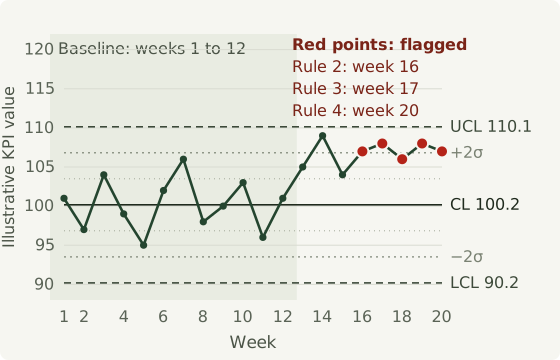
No single point crosses the upper control limit, so a chart that only watches for spikes would stay quiet. The points stop alternating around the centre line instead. Rule 2 fires in week 16, when two of three recent points are beyond the 2? line. Rule 3 fires in week 17, once four of five recent points are beyond the 1? line. Rule 4 fires in week 20, when the eighth consecutive point sits above the centre line.
The useful lesson is that a level shift is often visible as a run rather than as one dramatic point. Teams that only look for outliers can miss it for weeks. The anomaly detection article covers spikes and level shifts from a different angle, and it is worth reading alongside this one.
Building one in a spreadsheet
You need a time series and a spreadsheet. The steps are the same whether the metric is sign-ups, support tickets or order value:
- Define the metric and the period, for example weekly sign-ups counted by the Monday that starts each week.
- Export the series in time order, with one row per period. Check for missing periods and duplicates before you calculate anything. The datetime hygiene article lists the usual traps.
- Choose a baseline period that you judge to be normal, and record why you chose it.
- Calculate the centre line and the limits from that baseline only.
- Plot the full series with the limits, and mark the events you already know about, such as launches and price changes.
- Apply the rules you chose. Investigate each signal before you draw a conclusion from it.
- Recalculate the limits only when the process has changed on purpose.
If you are still deciding which metric deserves a control chart, start with the data itself. KPI Master is a free browser tool that produces a written summary, key numbers, trends and exportable reports from a spreadsheet or structured file. The file is processed on your device. It gives a first look at unusual values and data quality. It does not decide which process to monitor, and the spreadsheet analysis guide explains how to read its results before you act on them.
Common mistakes
- Recalculating limits every period. Limits that move with the latest data will eventually absorb the shift you wanted to detect.
- Treating control limits as targets. Limits describe what a process does. A stable process can still sit below the goal, so compare the centre line with the target separately.
- Mixing definitions. If sign-ups were counted differently before a form change, the chart shows a shift that is really a measurement change. Annotate definition changes on the chart. The data quality article covers how such problems hide in dashboards.
- Reacting to every point. Adjusting a process in response to ordinary variation usually adds variation of its own.
- Ignoring seasonality. A December peak looks like a signal unless the season is removed or each period is compared with the same period in earlier years.
Frequently asked questions
Is a control limit the same as a forecast interval?
No. A control limit describes the range the process produced during the baseline period, and it is used to judge whether new points still belong to that process. A forecast interval describes where a model expects future values to fall, and it depends on the model's assumptions. Both can be wrong when the process changes. The article on confidence intervals in forecasting explains what a forecast interval does and does not promise.
How many points should the baseline contain?
There is no universal number. The baseline needs enough points to show what normal variation looks like, and it should not include a period you already know was abnormal. Watch the limits as you add points. If they keep moving a lot, the baseline is too short or mixes different conditions.
Do I need all four rules?
No. Choose the rules that match the decisions you will make, state them on the chart, and remember that each added rule raises the false alarm rate. The one-in-91.75 figure above applies to normally distributed observations when all four rules are used.
What about metrics with a strong seasonal pattern?
Remove the seasonal pattern first, or compare each period with the same period in earlier years. The seasonality detection article shows how to check whether a pattern is there before you interpret a single point.
Can I use this for rates calculated from small counts?
Be careful. A rate built from a few events can jump for reasons unrelated to the process, and the assumptions behind the limits may not hold. Test the chart on past data before you trust its signals, or use a chart type designed for counts and proportions.
Does a signal prove what caused the change?
No. A signal says the process has behaved differently from its baseline. The cause still has to be investigated. Some signals come from a launch, a price change or a tracking bug, and some come from a definition change that nobody recorded.